

Your training calendar is a guide, not a rulebook. Life happens, and your program is designed to move with you. The drag-and-drop feature in the OAT Fit App gives you flexibility without losing the structure that makes training effective.
Why Drag & Drop Exists
No program works perfectly 100% of the time. Travel, work, weather, energy levels, illness all affect how your week unfolds.
You don’t need to check every box for your training to work. Consistency over time matters far more than perfection in any single week. That’s exactly why drag and drop exists.
Use it to adapt your schedule without stress or guilt.
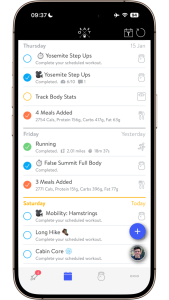
How to Customize Your Calendar
Inside the OAT Fit App:
- Press and hold on any workout or activity
- Drag it to a different day that works better
- Release to save the change
Important note: The app shows a rolling 14-day calendar. If you drag a workout beyond that window, it may appear to disappear, but it hasn’t been deleted. It’s simply moved outside the visible range and will show up once it falls back within the next 14 days.

Real-World Example: Moving a Long Effort
Let’s say your long hike was scheduled for Saturday—but the weather turned, family came into town, or the day just didn’t work.
If Sunday is better, simply drag your long hike to Sunday.
If you already have mobility or stability work scheduled, you can:
- Move those sessions to Saturday
- Or shift them to another day that fits your week
The goal is to keep training moving forward without forcing it into a rigid schedule.
Real-World Example: Needing an Extra Rest Day
Another common scenario: you’re feeling run down, short on sleep, or your legs just aren’t there.
In that case, it’s completely reasonable to:
- Skip or move a core session
- Push an upper-body workout later in the week
- Take a full rest day and resume training the next day
Missing or moving a lower-priority session occasionally will not derail your progress. Listening to your body and staying consistent over time matters more than squeezing everything into one week.
General Scheduling Guidelines (Not Rules)
When moving workouts around, keep these principles in mind:
- Try to spread out harder lower-body days when possible
- Keep longer efforts on days when you have more time, often weekends
- Mobility, core, and upper-body sessions are usually easier to move
- If something feels off, it’s okay to adjust
These are guidelines, not requirements. Your calendar should support your life—not control it.
When Drag & Drop Is Enough (and When It’s Not)
Drag & drop works well when:
- You’re moving workouts within the same week
- You miss a day or two
- You’re adjusting around travel, work, or weather
Send your trainer a message if:
- You miss an 7 or more days
- You’re returning from illness, injury, or extended travel
- You’re unsure whether something should be skipped or adjusted
If you have more questions about how can customize your calendar, read this article.
That’s when we can help realign your program so you’re progressing safely and sustainably.


